1. Home
  2. Knowledge Base
  3. cPanel
  4. Webmail
  5. Roundcube Webmail
  6. How to manage disk usage in Webmail and delete the old emails via Query? 
  1. Home
  2. Knowledge Base
  3. cPanel
  4. How to manage disk usage in Webmail and delete the old emails via Query? 
  1. Home
  2. Knowledge Base
  3. Webmail
  4. How to manage disk usage in Webmail and delete the old emails via Query? 

How to manage disk usage in Webmail and delete the old emails via Query? 

Step1: Login to the Webmail with your login credentials.

Step2: Click on the storage usage on the webmail home page.

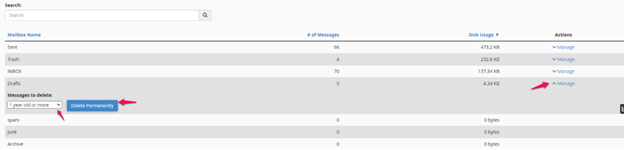
Step3: Choose the Inbox, Sent, Trash or Junk folders and click on Manage.

Step4: Delete the unwanted emails by sorting the emails (older emails or larger sized emails).

Step5: Click on the Permanently delete.
Related Articles

Need Support?
Can't find the answer you're looking for?
Contact Support