Last reviewed: 27th September 2026
Quick Answer
You can check your domain registrar, registration information, nameservers, and expiration date using a WHOIS lookup service such as https://who.is/. Simply enter your domain name to view the publicly available registration details.
How to Find Your Domain Registrar and Expiration Date
Step 1: Open a Web Browser
Launch your preferred web browser.
Step 2: Visit the WHOIS Lookup Website
Navigate to:
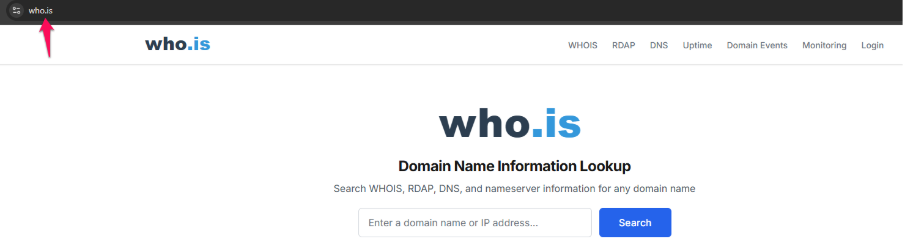
Step 3: Enter Your Domain Name
In the WHOIS Search box, type your domain name.
Example:
example.com
Step 4: Start the Search
Click the Search button or press Enter.
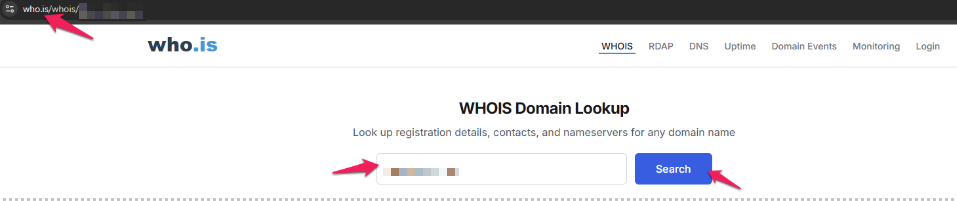
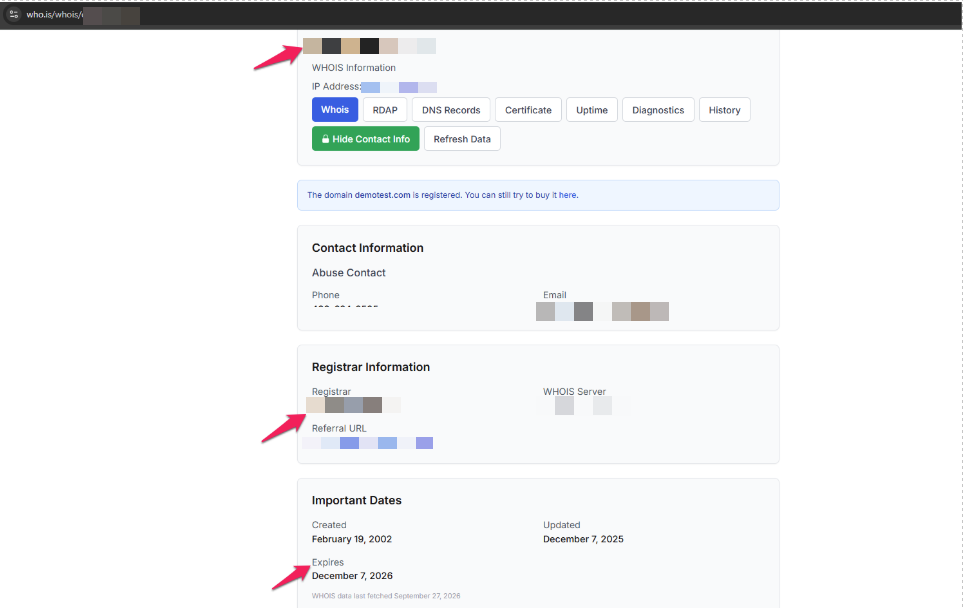
Step 5: Review the WHOIS Information
The search results will display relevant domain registration details, which may include:
- Domain Registrar
- Registration Date
- Expiration Date
- Last Updated Date
- Domain Status
- Nameservers
Step 6: Locate the Registrar
To find the company where the domain is registered, look for the Registrar field.
Example:
Registrar: Oryon Networks Pte Ltd
Step 7: Locate the Expiry Date
Find the field labeled “Expiration Date” or “Registry Expiry Date.”
Example:
Expiry Date: 15 January 2027
Understanding the WHOIS Information
Registrar
The organization through which the domain was registered.
Examples:
- Oryon Networks
- GoDaddy
- Namecheap
- Tucows
- Network Solutions
Registration Date
The initial registration date of the domain.
Expiry Date
The expiration date of the domain registration in the event that it is not renewed.
Nameservers
The DNS servers currently responsible for managing the domain’s DNS records.
Domain Status
Displays the current status of the domain registration.
Examples:
- Active
- Client Transfer Prohibited
- Redemption Period
Alternative Method: Check Through Your Domain Provider Account
Step 1: Log In to Your Domain Management Portal
Sign in to the registrar account where the domain was purchased.
Step 2: Open Domain Management
Navigate to the Domains or My Domains section.
Step 3: Select the Domain
Choose the domain name you wish to review.
Step 4: View Domain Details
The registrar, renewal date, and expiration date will typically be displayed on the domain overview page.
Common Problems
Unable to Find the Expiry Date
- Due to privacy laws, some WHOIS records may conceal sensitive information.
- If the expiration date is not visible, get in touch with your registrar.
Domain Registrar Is Unknown
- To find the registrar, use a WHOIS lookup service.
- Verify the domain name was entered correctly.
WHOIS Information Appears Incomplete
- Certain domain extensions may restrict public WHOIS information.
- The registrar can provide complete records to the domain owner.
Domain Has Expired
- Contact the registrar immediately to determine whether the domain can still be renewed.
- Additional redemption fees may apply if the renewal grace period has passed.
Additional Information
A public database called WHOIS offers details on registered domain names. It can be used to determine:
- Domain Registrar
- Registration and Expiry Dates
- Nameservers
- Domain Status
- Registrar Contact Information
Please be aware that due to data protection and privacy laws, some ownership information may be concealed.
Need help managing your Domain Name?
Oryon provides domain registration, renewals, transfers, DNS management, website hosting, SSL certificates, and ongoing technical support for businesses in Singapore.