

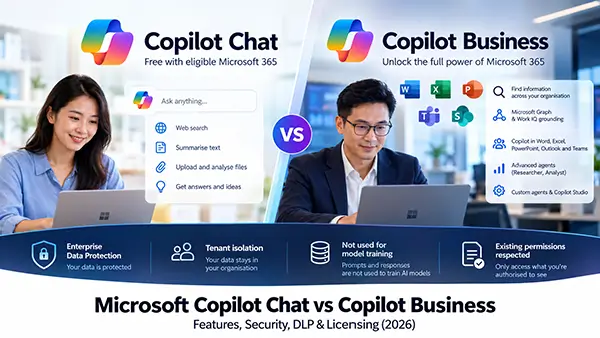
Microsoft offers two main AI experiences for business users: Microsoft Copilot Chat, available at no additional cost with eligible Microsoft 365 subscriptions, and the paid Microsoft 365 Copilot Business offering.
Both provide AI-powered assistance and Enterprise Data Protection. However, they differ significantly in how they access company information, work with Microsoft 365 applications, support AI agents and assist employees with everyday tasks.
A common misconception is that free Copilot Chat has no access to Microsoft 365 information, while paid Copilot Business has stronger data protection. Neither statement is entirely accurate.
Free Copilot Chat can work with company information in supported scenarios, and both offerings share Microsoft’s core Enterprise Data Protection commitments.
The main advantage of paid Copilot Business is its ability to understand and work across organisational information through Microsoft Graph, Work IQ and deeper application integration.
This article compares their capabilities, licensing requirements and security implications, including important considerations for businesses handling confidential information.
1. Understanding Microsoft’s Copilot offerings
Before comparing features, it is useful to understand Microsoft’s product terminology.
Microsoft has been updating its Copilot branding and licensing descriptions. Depending on your subscription and application, you may encounter the following labels.
Copilot Chat (Basic)
This is the baseline AI chat experience available without purchasing a separate Copilot add-on licence.
Users can perform general AI tasks, research information from the web, upload documents, analyse content and generate text.
Copilot Chat primarily relies on information from the web and content that users explicitly provide.
However, it can also work with certain organisational information through supported applications, particularly Outlook, or through agents configured to access company data.
Microsoft 365 Copilot (Basic)
Some eligible Microsoft 365 users have standard access to Copilot features directly within applications such as Word, Excel and PowerPoint, even without purchasing the Copilot add-on.
This is not the same as receiving the complete paid Copilot experience.
Availability depends on the user’s existing Microsoft 365 subscription, tenant configuration and Microsoft’s service capacity.
Microsoft 365 Copilot (Premium)
This describes the full paid Copilot experience.
For small and medium-sized businesses, Microsoft provides this experience through Microsoft 365 Copilot Business, an add-on designed for eligible organisations with up to 300 users.
It introduces broader Microsoft 365 organisational grounding, priority AI access, advanced agents and more comprehensive integration with Microsoft 365 applications.
Microsoft is also transitioning the broader product name from Microsoft 365 Copilot to Microsoft Copilot. Some licensing pages and application interfaces may continue to use the older terminology.
2. Free Copilot Chat vs paid Copilot Business: Complete comparison
The following table focuses on the capabilities most relevant to business users.
| Capability | Free Copilot Chat | Paid Copilot Business |
|---|---|---|
| Additional Copilot licence | Not required | Required |
| Eligible Microsoft 365 subscription | Required | Required |
| Enterprise Data Protection | Yes | Yes |
| Prompts used to train foundation models | No | No |
| Web-grounded AI chat | Yes | Yes |
| General questions and troubleshooting | Yes | Yes |
| Drafting and rewriting content | Yes | Yes |
| Summarising pasted text | Yes | Yes |
| File upload and analysis | Yes | Yes |
| Image generation | Yes | Yes |
| Full Microsoft Graph / Work IQ grounding | No | Yes |
| Access to organisational information | Limited contexts | Broad integration |
| Find information across Microsoft 365 | Limited | Comprehensive |
| Cross-document reasoning | On supplied or supported content | Across accessible work data |
| Copilot in Word | Licence-dependent | Full supported experience |
| Copilot in Excel | Licence-dependent | Full supported experience |
| Copilot in PowerPoint | Licence-dependent | Full supported experience |
| Copilot in Outlook | Supported capabilities | Expanded capabilities |
| Copilot in Teams | Limited or licence-dependent | Comprehensive capabilities |
| Advanced Researcher / Analyst agents | Not included | Included |
| Basic custom agents | Supported | Supported |
| Agents accessing company information | PAYG in applicable scenarios | Included in supported scenarios |
| Copilot Studio | Limited/PAYG | Included capabilities; advanced usage may be metered |
| AI model access | Standard | Priority |
| Peak-time availability | Capacity-dependent | Priority |
| Broad organisational search | No | Yes |
| Best for occasional AI assistance | Excellent | Excellent |
| Best for daily Microsoft 365 productivity | Suitable for basic tasks | Stronger choice |
Feature availability depends on the underlying subscription, enabled applications, administrator settings and Microsoft’s ongoing product updates. PAYG refers to pay-as-you-go billing.
3. The biggest difference: Access to your company’s information
The most significant difference between free Copilot Chat and paid Copilot Business is not simply the AI model.
It is the information available to the AI when answering questions.
AI systems work better when they have access to relevant and accurate context. In Microsoft’s ecosystem, this process is commonly called grounding.
How free Copilot Chat works
Free Copilot Chat primarily uses information from the web and content provided by the user.
For example, an employee could ask:
“Summarise the attached sales report and identify three areas where revenue declined.”
The employee uploads the report, and Copilot analyses its contents.
This is useful, but the employee generally needs to identify and provide the relevant information.
Free Copilot Chat does not automatically offer the same broad discovery of organisational files, emails, chats and meetings as the paid experience.
There are important exceptions.
In supported Outlook experiences, free Copilot Chat can access relevant information from emails, calendars, meetings, chats and a limited collection of related files. It is not always restricted to the currently open email.
Users can also work with content open in supported Microsoft 365 applications or use agents with authorised access to organisational data.
These capabilities should not be confused with the broader Microsoft 365-wide grounding provided by paid Copilot.
How paid Copilot Business works
Paid Copilot Business uses Microsoft Graph, Work IQ and semantic indexing to connect AI responses with relevant organisational information.
With the necessary permissions and services enabled, users can ask questions involving information spread across Microsoft 365.
For example:
“Prepare a summary of the latest customer project, including outstanding tasks, recent email discussions, meeting decisions and documents requiring approval.”
Instead of manually collecting every document, Copilot can search supported organisational sources and combine relevant information into a response.
It can use context from accessible emails, files, calendars, chats, meetings and related Microsoft 365 content.
Work IQ helps the system understand relationships between organisational content, activities and people.
This makes paid Copilot substantially more useful for employees who regularly work across multiple Microsoft 365 applications.
Work IQ can also be disabled by administrators. If it is disabled, the broader work-context grounding will not operate as it normally would.
4. Copilot in Word, Excel, PowerPoint, Outlook and Teams
Microsoft 365 application integration is another major consideration.
Microsoft Word
Copilot can assist with drafting, rewriting, summarising and improving documents.
With paid Copilot, users have the full supported in-app experience with priority access. They can also use broader organisational context where supported.
Without the paid add-on, some users may still receive standard in-app capabilities, depending on licensing.
For employees preparing lengthy proposals, management reports or customer documentation, the paid experience can reduce the time spent gathering information and preparing initial drafts.
Microsoft Excel
Copilot can help explain formulas, analyse spreadsheet information, identify patterns and create visualisations.
Free Copilot Chat can analyse an uploaded spreadsheet.
Some unlicensed users may also have standard Copilot functionality within Excel itself.
The paid experience provides more comprehensive integration, higher service priority and access to broader work context.
However, AI-generated calculations and conclusions should still be independently verified, particularly for financial reporting and management decisions.
Microsoft PowerPoint
Copilot can assist with generating presentations, summarising slides and refining content.
Eligible users without a paid add-on may receive some standard PowerPoint Copilot capabilities.
Paid Copilot provides the broader supported experience, including integration with relevant organisational content where available.
This can be especially useful when preparing presentations from existing reports, project documentation and management updates.
Microsoft Outlook
Outlook is an important exception to the assumption that free Copilot cannot access company information.
Microsoft supports organisational grounding for eligible free Copilot Chat users in Outlook.
Depending on the supported Outlook experience, users can ask questions about their inbox, calendar, meetings, chats and limited related information.
Paid Copilot provides broader organisational grounding and richer cross-application reasoning.
The distinction is therefore not simply whether Copilot can read an email. It is how comprehensively it can connect information across the organisation.
Microsoft Teams
Some Teams-related Copilot capabilities, including certain summarisation experiences, may be available without the paid add-on, depending on licensing and configuration.
However, the complete paid Copilot meeting experience provides deeper assistance with meeting discussions, action items, follow-up questions and related organisational context.
Live meeting Copilot functionality has its own licensing and meeting-policy requirements. Transcription and recording settings can also affect what information is available.
Businesses should verify these requirements rather than assuming every Teams user receives identical Copilot capabilities.
5. AI agents, Researcher, Analyst and Copilot Studio
Microsoft Copilot is increasingly becoming a platform for AI agents rather than only a conversational assistant.
Agents can perform specialised tasks, access defined information sources and, when appropriately configured, execute actions.
Agents available with free Copilot Chat
Free Copilot Chat supports certain declarative agents based on instructions and public websites.
Businesses can use these for straightforward tasks that do not require direct access to confidential organisational data.
Agents that access shared tenant information, including SharePoint content or supported Microsoft Graph-connected sources, generally require pay-as-you-go billing for users without the paid Copilot licence.
PAYG access for these users is turned off by default and must be configured by an administrator.
Additional capabilities with paid Copilot Business
Paid Copilot includes advanced reasoning agents such as Researcher and Analyst, together with broader access to custom agents.
Researcher can assist with investigating a topic, collecting relevant information and preparing a structured research report.
Analyst can assist with investigating datasets, identifying trends and supporting analytical work.
These capabilities are particularly relevant to management, finance, sales and operations teams.
Does paid Copilot include Copilot Studio?
Paid Copilot includes certain Copilot Studio capabilities, particularly for building and using agents within Microsoft 365.
However, businesses should not interpret this as unlimited access to every Copilot Studio service.
Advanced autonomous workflows, certain specialised AI experiences, external integrations and other metered capabilities may incur additional Copilot Credits or usage-based charges.
For instance, Microsoft identifies advanced experiences such as Copilot Cowork, Copilot Code, Autopilot and Work IQ APIs as usage-based capabilities.
Agent licensing, intended users, deployment channels and anticipated usage should be reviewed before production deployment.
6. Is free Copilot Chat as secure as paid Copilot Business?
From the perspective of Microsoft’s core Enterprise Data Protection commitments, the two products have substantial similarities.
This is frequently misunderstood.
Purchasing Copilot Business does not automatically mean that the organisation receives a completely different set of baseline AI data-protection commitments.
Both offerings are designed to protect business information when accessed through eligible Microsoft Entra work accounts.
Security and data protection comparison
| Security capability | Free Copilot Chat | Paid Copilot Business |
|---|---|---|
| Enterprise Data Protection | Yes | Yes |
| Microsoft DPA and Product Terms | Yes | Yes |
| Microsoft as data processor for covered customer data | Yes | Yes |
| Encryption at rest and in transit | Yes | Yes |
| Tenant data isolation | Yes | Yes |
| Prompts and responses protected | Yes | Yes |
| Prompts excluded from foundation model training | Yes | Yes |
| Existing user permissions respected | Yes | Yes |
| Microsoft Purview integration | Supported, licence-dependent | Supported, licence-dependent |
| Sensitivity labels | Supported, licence-dependent | Supported, licence-dependent |
| Retention and audit | Supported, licence-dependent | Supported, licence-dependent |
| Full Graph and Work IQ grounding | No | Yes |
| Broad automatic organisational discovery | No | Yes |
| Exposure to existing oversharing problems | More limited discovery | Greater discoverability |
The availability of particular Purview controls depends on the underlying Microsoft 365 subscription and any additional compliance licences.
What Enterprise Data Protection means
Microsoft’s Enterprise Data Protection commitments include contractual and technical protections for covered customer data.
These include encryption, tenant isolation, adherence to existing access permissions and Microsoft’s commitment not to use protected prompts, responses or Microsoft Graph data to train foundation models.
Microsoft’s Data Protection Addendum and Product Terms apply to the covered business AI experiences, with Microsoft acting as a data processor.
This should not be confused with consumer Copilot used through a personal Microsoft account.
Organisations should ensure employees use their eligible work accounts for business AI activities.
Does Microsoft use company data to train AI models?
Microsoft states that prompts, responses and organisational data accessed through Microsoft Graph in these enterprise-protected experiences are not used to train foundation models.
This applies to both free Copilot Chat and paid Copilot Business.
However, this does not mean that conversations are never stored.
Prompts and responses may be logged and retained within Microsoft 365 for applicable compliance, security, auditing and eDiscovery purposes.
Authorised administrators and compliance personnel may be able to retrieve relevant records, subject to permissions, licensing and configured policies.
7. Important privacy consideration: Copilot web searches
Both free and paid Copilot can use web searches to obtain information from the internet.
Microsoft may generate short search queries based on a user’s prompt and send them to Bing for web grounding.
These generated queries are not necessarily identical to the original prompt.
Microsoft states that user and tenant identifiers are removed, and the generated queries are not shared with advertisers or used to train foundation models.
However, Bing-generated web search queries are handled under different data-protection arrangements from Microsoft 365 prompts and responses.
Microsoft acts as an independent data controller for these search queries. Microsoft’s enterprise DPA does not apply to them in the same way as it does to protected Copilot prompts and responses.
Generated search terms may also be informed by content that users supply.
For organisations handling highly confidential information, this distinction matters.
Administrators can manage web search availability, and organisations with suitable Microsoft Purview capabilities can configure DLP controls to prevent certain sensitive information from being used for external web grounding.
8. Enterprise Data Protection is not the same as Data Loss Prevention
This is one of the most important security distinctions for businesses.
Enterprise Data Protection establishes core safeguards governing how Microsoft processes protected customer data.
Data Loss Prevention, or DLP, is concerned with controlling how sensitive information is used, shared or disclosed.
Having EDP does not automatically guarantee that employees cannot misuse confidential information or process information they should not be handling.
How Microsoft Purview DLP helps protect Copilot
With suitable licensing and configuration, Microsoft Purview DLP can restrict certain Copilot activities.
For example, an organisation may configure policies that prevent Copilot from processing documents carrying particular sensitivity labels.
DLP can also detect configured sensitive information types in typed prompts and restrict processing or external web searches.
This may be useful for information such as identification numbers, payment-card details, customer account information and other confidential business records.
Certain capabilities have rollout or preview restrictions, and administrators should verify what is available in their tenants.
An important limitation involving uploaded files
Microsoft documents a significant limitation concerning files uploaded directly into Copilot prompts.
The Copilot-specific DLP policy cannot inspect the contents of those uploaded files for sensitive information types during the prompt evaluation.
It evaluates the text typed into the prompt instead.
This means businesses should not assume that a Copilot DLP policy examining sensitive prompts will automatically identify and block every confidential document manually uploaded by an employee.
Other safeguards, such as sensitivity labels, encryption, endpoint DLP, user permissions and access restrictions, remain important.
For businesses where preventing confidential data leakage is a priority, EDP alone is not a sufficient data-protection strategy.
9. The hidden security risk of paid Copilot: Overshared SharePoint information
Paid Copilot Business introduces a particular governance challenge because it can make existing company information substantially easier to discover.
Consider a business that stores its documents in SharePoint Online.
An HR folder contains employee salary records and internal performance reviews.
Due to an incorrectly configured SharePoint permission group, employees outside HR can access the folder.
Without Copilot, those employees might never know the documents exist.
With paid Copilot, an employee could ask a question about employee compensation, and relevant documents might become easier to discover if the employee already has permission to access them.
This does not mean Copilot has bypassed security.
It means the existing permissions were too broad.
Copilot generally respects the user’s existing access rights. However, AI-powered search and reasoning can make authorised but unintended access considerably more practical.
How to reduce this risk
Businesses should review SharePoint site access, group memberships, anonymous and company-wide sharing links, inherited permissions and sensitive document locations.
Microsoft also provides SharePoint governance capabilities such as Restricted Content Discovery.
This can temporarily limit the discovery of selected SharePoint sites through organisation-wide search and Copilot while administrators investigate permissions and data governance issues.
However, Restricted Content Discovery does not revoke underlying access permissions. It is a discovery control, not a substitute for correcting excessive access rights.
For highly sensitive information, administrators should evaluate stronger permission restrictions, appropriate sensitivity labels and other information-protection measures.
10. Audit logging, retention and compliance
Both free Copilot Chat and paid Copilot Business support Microsoft 365 compliance capabilities, subject to licensing and configuration.
Microsoft Purview can support audit records, retention policies, eDiscovery and other governance processes.
For organisations handling confidential customer information, these controls are useful for investigating suspected misuse, reviewing AI interactions and meeting internal record-keeping obligations.
There is an important detail for small businesses.
Microsoft documents that unified auditing is not enabled by default for certain SMB licences, including Microsoft 365 Business Basic, Business Standard and Business Premium.
Administrators should therefore verify whether auditing is enabled rather than assuming that every tenant is already recording the required activity.
Retention requirements should also be reviewed, since the availability and duration of audit and compliance records vary by licence and policy.
Businesses subject to regulatory requirements, including financial institutions, should evaluate the overall AI deployment against their applicable contractual, confidentiality and regulatory obligations.
Microsoft’s security commitments do not automatically establish compliance with every industry requirement.
11. Microsoft 365 Copilot Business licensing and pricing
Copilot Chat is included at no additional Copilot charge for users with qualifying Microsoft 365 subscriptions.
Microsoft 365 Copilot Business is a paid add-on designed for eligible smaller organisations, supporting up to 300 licensed users per tenant.
Microsoft currently identifies several eligible prerequisite plans, including Microsoft 365 Business Basic, Business Standard, Business Premium, Microsoft 365 Apps for Business and Microsoft Teams Essentials.
The underlying subscription matters.
For example, Microsoft 365 Business Basic provides web and mobile Office applications, not the full desktop Office suite.
Adding Copilot Business does not automatically add desktop Office application rights.
Similarly, a subscription that does not provide Exchange Online, SharePoint or particular Teams capabilities cannot be assumed to offer the same work-data context as a complete Microsoft 365 Business Standard or Premium environment.
12. Which Copilot option should your business choose?
Not every employee requires a paid Copilot licence.
The decision should be based on how employees work, which information they need and the value of the additional capabilities.
Choose free Copilot Chat when…
Employees primarily need AI assistance for writing, brainstorming, general research, troubleshooting or analysing documents that they can manually supply.
It is a practical starting point for organisations introducing generative AI to employees while maintaining Microsoft’s Enterprise Data Protection commitments.
Choose paid Copilot Business when…
Employees regularly work across Outlook, Teams, Word, Excel, PowerPoint and SharePoint.
The strongest use cases involve people who spend significant time gathering information, preparing reports, reviewing meetings, drafting business documents and coordinating projects.
Managers, sales professionals, project teams and knowledge workers may benefit from Copilot’s ability to connect information across multiple Microsoft 365 sources.
However, increased information discoverability also makes permission reviews and data governance more important.
Consider a mixed licensing approach
For many SMEs, a mixed deployment is a sensible starting point.
Provide eligible employees with free Copilot Chat and purchase Copilot Business licences for roles with demonstrable requirements for work-data grounding and advanced productivity features.
This allows the organisation to assess productivity improvements before expanding the paid deployment.
It also gives IT administrators more time to improve SharePoint governance, classification and DLP controls.
13. Security checklist before deploying Copilot Business
Businesses should treat Copilot deployment as both a productivity initiative and a data-governance exercise.
A practical deployment plan should include the following:
- Review existing permissions. Audit SharePoint, OneDrive, Teams and relevant Microsoft 365 group access. Identify documents accessible to more employees than necessary.
- Identify confidential information. Establish information categories, document owners, sensitivity labels and appropriate access restrictions for financial, HR, legal and customer information.
- Evaluate DLP controls. Review available Microsoft Purview licensing and configure supported policies for sensitive prompts, labelled content and web search behaviour. Test actual enforcement rather than assuming policy coverage.
- Verify audit and retention settings. Confirm that unified auditing is enabled and determine whether available retention and investigation capabilities meet business requirements.
- Govern AI agents and external connections. Review which agents employees can install, what information they can access, whether third-party processing terms apply and whether usage-based billing is enabled.
- Run a controlled pilot. Begin with a limited group of users, test representative workloads, check source accuracy and assess whether Copilot exposes information that requires tighter governance.
- Train employees and review outcomes. Establish rules for handling confidential information, verifying AI-generated responses and reporting inappropriate outputs. Monitor adoption and assess whether the benefits justify additional licensing.
Businesses should also maintain appropriate identity security, multifactor authentication, endpoint protection and access governance across the Microsoft 365 environment.
Copilot is not a replacement for these controls.
14. Frequently asked questions
Is Microsoft Copilot Chat free for business users?
Yes. Eligible Microsoft 365 work or school accounts can access Copilot Chat without purchasing a separate paid Copilot add-on.
An eligible underlying subscription is still required.
Does free Copilot Chat have Enterprise Data Protection?
Yes. Microsoft provides Enterprise Data Protection for eligible Copilot Chat users signed in with their Microsoft Entra work accounts.
This should not be confused with using a consumer Microsoft account.
Can free Copilot Chat access company emails and files?
Yes, in certain circumstances.
For example, supported Outlook experiences provide access to a limited set of organisational information, including emails, calendars and related content.
Users can also provide files directly or use appropriately configured agents.
However, free Copilot Chat does not provide the same broad, automatic organisational grounding available through paid Copilot Business.
Is paid Copilot Business more secure than free Copilot Chat?
Both share Microsoft’s core Enterprise Data Protection commitments.
Paid Copilot does not automatically deliver superior baseline protection for prompts and responses.
Its broader organisational search capabilities may introduce additional information-discovery risks if existing permissions are excessive.
Actual security depends heavily on the organisation’s identity controls, permissions, classification, DLP and governance configuration.
Can Copilot access confidential SharePoint files?
Copilot generally respects the user’s existing permissions and applicable protection policies.
If a user has permission to access a confidential document, Copilot may be able to process that document where supported.
Sensitivity labels, encryption permissions and properly configured DLP controls can impose additional restrictions.
This is why SharePoint access reviews are particularly important before deploying paid Copilot.
Does Copilot Business include Microsoft 365 Business Premium?
No. Copilot Business is an AI add-on that requires an eligible underlying licence.
Microsoft also offers bundles combining Copilot with Business Standard or Business Premium.
Businesses should distinguish between purchasing the add-on and purchasing a bundled Microsoft 365 subscription.
Does Microsoft train its AI models using business prompts?
Microsoft states that covered Copilot Chat and Copilot Business prompts, responses and Microsoft Graph data are not used to train foundation models.
This does not mean conversations cannot be logged or retained for applicable compliance and operational purposes.
Organisations should also review the separate treatment of web search queries and any third-party agents.
Is DLP automatically included with Copilot Business?
Not every advanced DLP capability is included simply because a user has Copilot Business.
Available Microsoft Purview controls depend on the underlying subscription, additional licensing, product support and policy configuration.
Businesses should validate their specific licensing entitlements before promising comprehensive protection against data leakage.
Final recommendation
Free Microsoft Copilot Chat is a capable AI assistant for business users who need general productivity assistance, document analysis and web-based research.
For many employees, it may be sufficient.
Paid Copilot Business provides greater value when users need AI to work across Microsoft 365, connect organisational knowledge, prepare business documents and support more sophisticated workflows.
However, the decision should not be based only on feature availability.
Businesses should evaluate the sensitivity of their information, existing SharePoint permissions, security policies and regulatory responsibilities before enabling broader organisational AI access.
The right approach is to adopt Copilot in line with the organisation’s productivity needs and data-security maturity, rather than purchasing the paid licence for every user by default.
Need assistance with Microsoft 365 Copilot?
Oryon Networks helps Singapore businesses evaluate Microsoft 365 licensing, cloud productivity solutions and cybersecurity requirements.
Whether your organisation is considering free Copilot Chat, Microsoft 365 Copilot Business or a broader Microsoft 365 security review, a properly planned deployment can help balance business productivity with the protection of confidential information.
Contact us to discuss your Microsoft 365 and Copilot requirements.
Microsoft references
This article is based on Microsoft documentation and product information available as of 27 October 2026. Features, pricing and licensing may change.

