

This guide explains how to redeem your ChatGPT Business promotion using a partner URL, based on the instructions provided by OpenAI.
Step 1: Open the Partner’s Promotional URL
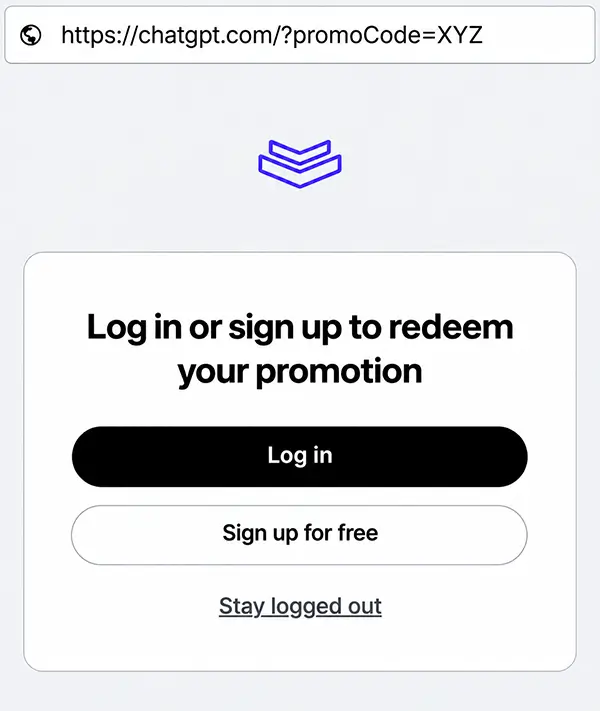
Start by opening the unique promotional URL provided by your OpenAI partner.
Copy and paste the complete URL directly into your web browser’s address bar. This ensures that you access the intended promotional redemption page.
You should be redirected to ChatGPT, where you’ll be prompted to log in or create an account.
Important: Always use the original partner URL provided to you. Simply visiting the standard ChatGPT website may not activate the promotion.
Step 2: Sign In or Create a ChatGPT Account
Once you’ve opened the promotional URL, you’ll be presented with the option to sign in or create a new ChatGPT account.
- Existing ChatGPT Plus users: Sign in using your existing account.
- New ChatGPT users: Create an account to continue with the redemption process.
The account used during registration should belong to the person who will administer your company’s ChatGPT Business workspace.
This administrator will be responsible for managing workspace members, subscription settings and billing.
Step 3: Review and Accept the Promotional Offer
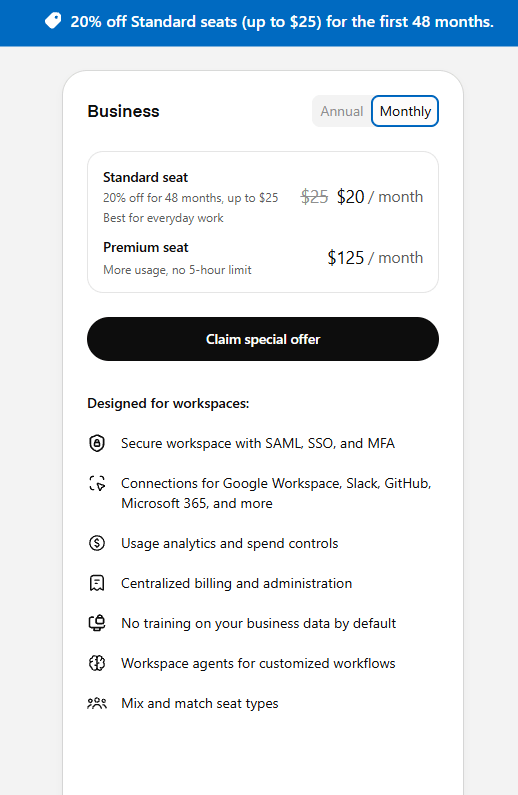
After signing in, you should see the ChatGPT Business subscription page displaying your promotional offer. After signing in, you should see the ChatGPT Business subscription page displaying your promotional offer. Please note that the image shows pricing in US dollars (USD) for illustration purposes. During registration, pricing will be displayed in your country’s applicable local currency.
Check that the promotional discount or pricing benefit appears correctly.
Depending on the offer, you may see a discounted subscription price or other promotional benefits.
Once you’ve confirmed that the promotion is displayed, click Claim special offer to proceed.
Do not continue if the expected promotion is missing. Instead, return to the original partner URL and restart the redemption process.
Step 4: Configure Your Subscription and Complete Checkout
You’ll be directed to the ChatGPT Business checkout page, where you can configure your subscription.
Before completing checkout, pay attention to the following:
1. Select Monthly Billing
The partner promotion described in this guide applies to monthly billing only. Ensure that the monthly billing option is selected rather than annual billing.
2. Select the Correct Number of Seats
A minimum of two ChatGPT Business seats is required.
Choose the total number of seats your organisation needs, including the workspace administrator and any additional partner seat required to enable services, where applicable.
3. Verify the Promotional Discount
Carefully review the subscription summary before confirming your purchase.
Make sure that:
- The promotional discount is reflected in the pricing.
- The billing cycle is set to monthly.
- The number of seats is correct.
- The amount due today matches the expected charges after applying the promotion.
Depending on the promotional offer and the number of seats selected, your subscription may still have an amount payable.
4. Complete Your Subscription
Once everything has been verified, provide your billing information and click Subscribe to complete the process.
Your ChatGPT Business workspace can then be configured for your organisation.
What If the Promotion Does Not Appear?
If you cannot see the promotional offer during registration or checkout, consider the following:
- Reopen the original promotional URL supplied by your partner.
- Verify that you’ve signed in using the intended ChatGPT account.
- Check whether your organisation meets the promotion’s eligibility requirements.
- Confirm that the promotional offer has not expired or been deactivated.
- Ensure that you’ve selected the required billing cycle and seat count.
Avoid completing checkout at the standard subscription price if you intended to redeem a promotional offer.
Important Information About Partner Promotions
Promotional offers are subject to OpenAI’s eligibility requirements and applicable terms and conditions.
The availability, discount amount, qualifying seats and promotional duration may vary depending on the specific offer.
Oryon Networks Pte Ltd is an OpenAI SMB Channel Partner. Our role is to facilitate eligible promotional applications and provide the relevant partner redemption instructions.
ChatGPT Business subscriptions, billing and payments are managed directly by OpenAI. Oryon does not collect subscription payments or have administrative access to customer ChatGPT Business workspaces.
Final Reminder: Before clicking Subscribe, always confirm that the promotional offer is visible and correctly reflected in the checkout summary. The promotional price displayed during checkout is the key reference for your subscription.
