

AI meeting assistants can record conversations, generate transcripts, summarise discussions and identify follow-up actions. For businesses, however, choosing the right tool involves more than comparing transcription quality.
The more important question is how meeting information fits into your existing workflow.
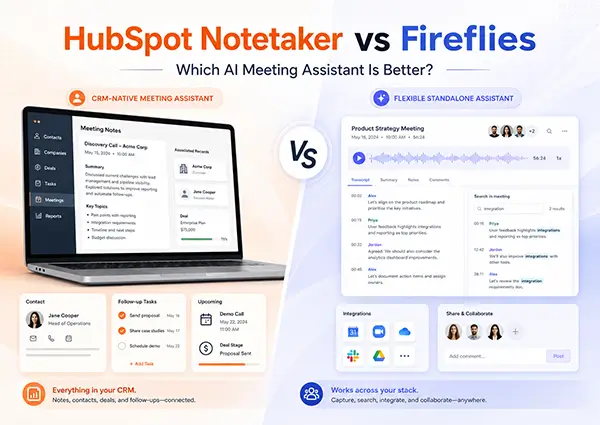
HubSpot Notetaker is designed as part of the HubSpot CRM and sales environment. Fireflies is a dedicated AI meeting assistant that works across multiple meeting platforms, applications and business systems.
This comparison examines their capabilities, limitations, pricing models and ideal use cases using information from official HubSpot and Fireflies sources.
The Main Difference
The simplest distinction is:
- HubSpot Notetaker is best suited to organisations that want meeting intelligence embedded directly within HubSpot.
- Fireflies is best suited to organisations that want a flexible, standalone meeting assistant that can work across different platforms and departments.
Neither approach is automatically better. The right choice depends on whether your priority is native CRM integration or broader meeting capture and collaboration capabilities.
What Is HubSpot Notetaker?
HubSpot Notetaker is an AI-powered meeting assistant within the HubSpot platform. It can join eligible meetings, record the conversation and provide:
- Video recordings
- Meeting transcripts
- AI-generated meeting notes
- Key topics discussed
- Recommended next steps
- Follow-up task creation
HubSpot currently supports Notetaker for meetings conducted through Google Meet, Microsoft Teams and Zoom. It is listed as a beta feature and generally requires an eligible Sales Hub Professional or Enterprise subscription with an assigned Sales seat. Certain Service Hub users may also access it through the Meeting Notetaker with Smart Deal Progression beta.
After a meeting, users can review the recording, transcript, summary, key notes and suggested next steps from the HubSpot sales workspace. They can also create follow-up tasks or send an email using the meeting notes.
HubSpot Notetaker’s Main Advantage
Its biggest advantage is that the meeting information already lives in the same environment as the organisation’s contacts, companies, deals, tasks and sales activities.
Sales representatives do not need to manually copy meeting notes from another platform into the CRM. Managers can review the conversation in the context of the relevant customer or sales opportunity.
HubSpot’s Smart Deal Progression beta can also analyse meeting and call transcripts alongside related deal information. It may then recommend CRM updates, surface high-value next steps and prepare follow-up email drafts for review.
What Is Fireflies?
Fireflies is a dedicated AI meeting assistant designed to capture, transcribe, summarise and search conversations.
It can participate in online meetings as a notetaker, but it also offers additional ways to capture conversations. Depending on the meeting environment, users can:
- Invite the Fireflies notetaker into an online meeting
- Record Google Meet through a Chrome extension without a visible bot
- Capture system audio through the Fireflies desktop application
- Record in-person meetings through the mobile application
- Upload existing audio or video recordings
- Add Fireflies to a meeting that has already started
Fireflies supports Google Meet, Zoom and Microsoft Teams, as well as other platforms such as Webex, GoToMeeting, Dialpad, Lifesize and Jitsi.
Fireflies’ Main Advantage
Its main advantage is flexibility.
Fireflies is not limited to meetings that meet specific CRM conditions. It can support sales calls, internal discussions, project meetings, interviews, customer support conversations and in-person meetings.
Its desktop application can capture system audio without adding a visible Fireflies participant to the conversation. Fireflies also offers a bot-free Chrome extension experience for Google Meet, including live transcripts, notes and AI assistance during the meeting.
HubSpot Notetaker vs Fireflies: Feature Comparison
| Area | HubSpot Notetaker | Fireflies |
|---|---|---|
| Primary purpose | CRM-native meeting intelligence | Dedicated cross-platform meeting assistant |
| Main meeting platforms | Google Meet, Microsoft Teams and Zoom | Google Meet, Teams, Zoom, Webex, GoToMeeting and others |
| AI summaries | Yes | Yes |
| Transcripts | Yes | Yes |
| Video recording | Yes, for supported meetings | Available on paid plans |
| Real-time assistance | Focuses primarily on HubSpot meeting preparation and follow-up | Live notes, transcripts, suggestions and AskFred through supported experiences |
| Bot-free recording | Limited alternative capture options within HubSpot | Chrome extension, desktop application and mobile application |
| CRM integration | Native to HubSpot | Integrates with HubSpot and other business applications |
| Deal recommendations | Available through eligible HubSpot beta features | Conversation and deal intelligence features depend on plan |
| Internal and in-person meetings | In-person iOS Notetaker is currently a separate beta | Desktop and mobile recording options available |
| Standalone free plan | Not offered as a separate product | Free plan available |
| Best suited for | HubSpot-centred sales and service teams | Cross-functional and multi-platform teams |
CRM Integration
HubSpot Notetaker
HubSpot has the strongest position when the organisation’s CRM is already the centre of its sales process.
Meeting recordings, summaries and transcripts can be reviewed within HubSpot. Representatives can create follow-up tasks and use suggested next steps without leaving the sales workspace.
However, a meeting must meet HubSpot’s eligibility conditions. According to HubSpot, an eligible meeting must:
- Be stored in HubSpot
- Include at least one external CRM contact
- Use Google Meet, Microsoft Teams or Zoom as its location
The external contact’s email address must also use a different domain from the HubSpot account. This makes HubSpot Notetaker particularly suited to customer and prospect meetings rather than every type of internal meeting.
Fireflies With HubSpot
Choosing Fireflies does not mean giving up HubSpot integration.
Fireflies can send meeting notes, summaries, transcript access and tasks to the relevant HubSpot contacts, companies or deals. It can also create contacts and convert meeting action items into HubSpot tasks, depending on the integration configuration.
Fireflies App Cards can display recent meetings, summaries, sentiment and important moments within HubSpot contact and company records.
The difference is that Fireflies remains the primary meeting-intelligence platform, while selected information is synchronised into HubSpot.
This gives businesses more capture flexibility, but it also means administering two separate systems.
Meeting Platform and Recording Flexibility
HubSpot supports the three platforms used by many businesses: Google Meet, Microsoft Teams and Zoom.
Fireflies supports those same platforms but extends coverage to additional conferencing systems. It also provides more ways to record conversations outside conventional scheduled video meetings.
For example, the Fireflies desktop application can capture system audio from applications and calls without placing a bot inside the meeting. Its mobile application can record in-person conversations, while existing audio and video files can be uploaded for transcription and summarisation.
This can make Fireflies more suitable for organisations where employees use different meeting platforms or need to document internal and in-person discussions.
AI Insights and Follow-Up
Both platforms move beyond basic transcription.
HubSpot’s advantage is that its AI outputs can be connected directly to CRM and deal workflows. Eligible users can review suggested next steps, create tasks, draft follow-up emails and consider recommended CRM updates based on meeting information.
Fireflies provides AI summaries, action items, meeting search and AskFred, its AI meeting assistant. Fireflies Business also includes conversation intelligence and team analytics, which can help managers review meeting behaviour and broader conversation patterns.
The practical difference is:
- HubSpot concentrates on turning customer conversations into CRM and pipeline actions.
- Fireflies concentrates on making conversations searchable, analysable and reusable across different workflows.
Pricing
Fireflies publishes standalone per-user pricing:
- Free: US$0
- Pro: US$10 per user per month when billed annually, or US$18 with monthly billing
- Business: US$19 per user per month when billed annually, or US$29 with monthly billing
- Enterprise: US$39 per user per month, billed annually
Feature availability, storage, video recording, analytics and AI-credit allowances vary by plan.
HubSpot Notetaker is not presented as a separate standalone subscription. Access depends on the organisation’s HubSpot package, assigned seats and beta eligibility. HubSpot currently lists the feature under eligible Sales Hub Professional and Enterprise subscriptions, with certain Service Hub access available through the relevant beta.
Businesses should therefore evaluate HubSpot Notetaker as part of the total cost of their HubSpot subscription rather than comparing it directly with Fireflies’ per-user price.
When Should You Choose HubSpot Notetaker?
HubSpot Notetaker is likely to be the better choice when:
- Your sales team already works primarily inside HubSpot.
- Eligible HubSpot seats are already assigned to the users who need meeting transcription.
- Most recorded meetings are with customers or prospects already represented in the CRM.
- You want recordings, summaries and next steps stored alongside contact and deal records.
- You want fewer separate tools for the sales team to manage.
- Your priority is moving from a customer conversation to a CRM task, follow-up email or deal update.
It is particularly attractive for organisations that want meeting intelligence to reinforce HubSpot adoption.
When Should You Choose Fireflies?
Fireflies is likely to be the better choice when:
- Meetings take place across several conferencing platforms.
- Multiple departments need an AI meeting assistant.
- You need to capture internal, in-person or less structured conversations.
- You want bot-free recording options.
- You want a dedicated searchable repository for meetings.
- Your organisation does not have eligible HubSpot seats for every user.
- You may change CRM platforms or use more than one business system.
- You prefer a clearly defined standalone subscription.
Fireflies may also be more economical when meeting transcription is required across a large group but only a smaller number of employees need advanced HubSpot sales seats.
Important HubSpot Change From 31 July 2026
HubSpot is changing how recorded meetings are logged.
From 31 July 2026, meetings recorded through HubSpot Notetaker or supported conferencing integrations will create only a meeting record. Previously, a recorded meeting could create both a meeting record and a call record.
Recordings, transcripts and summaries will live on the meeting record. Organisations using call-based reports or workflows should review and update them before the transition. Existing historical call records will remain available.
Final Verdict
There is no universal winner between HubSpot Notetaker and Fireflies.
HubSpot Notetaker is the stronger choice for CRM-native sales execution. It keeps meeting information close to contacts, deals, tasks and follow-up activities. For businesses already committed to HubSpot Sales Hub Professional or Enterprise, it may provide the simplest user experience.
Fireflies is the stronger choice for meeting capture flexibility. It supports more meeting environments, provides several recording methods and can serve sales, service, operations, recruitment and management teams from one dedicated meeting platform.
For many HubSpot customers, the decision comes down to this:
- Choose HubSpot Notetaker when the CRM should be the primary home for every customer conversation.
- Choose Fireflies when the meeting platform should operate independently and send selected information into HubSpot.
Before deployment, organisations should also review their meeting-recording policies, consent procedures, user permissions, data-retention requirements and applicable privacy obligations. HubSpot specifically advises customers that recording and transcription laws are complex and that organisations are responsible for establishing the appropriate legal basis for processing recorded personal data.
Product features, beta availability and pricing may change. Organisations should confirm the latest information directly with HubSpot or Fireflies before making a purchasing decision.

